How Google’s console explains itself
Before adding anything to someone else’s screen, read what’s already there. This is what a Google SecOps case explains on screen, and what it leaves to the documentation.
Contents
Before arguing that a console is hard to read, count it. A number can be disputed; an adjective cannot.
So an AI agent counted every icon, badge, colour and label in one case investigation view, by written rules: one row per mark per place, colours that vary get their own row, and near-universal conventions count as readable but are flagged.
By the AI agent’s count, under those rules, 51 of the 72 marks that are not text cannot be read without leaving the console.
Two things have to be said in the same breath as that number. Static screenshots cannot show tooltips, so some of them may speak on hover; the audit lists exactly which rows to check in a live tenant. And the console does one thing here that nothing else in the study does: the Security Graph, one click away, carries its own legend in the product, naming every shape and colour it draws.
What “explained only in the docs” looks like
This is the case header, as Google’s own documentation draws it. The green arrows are the documentation’s; the product has none of them.
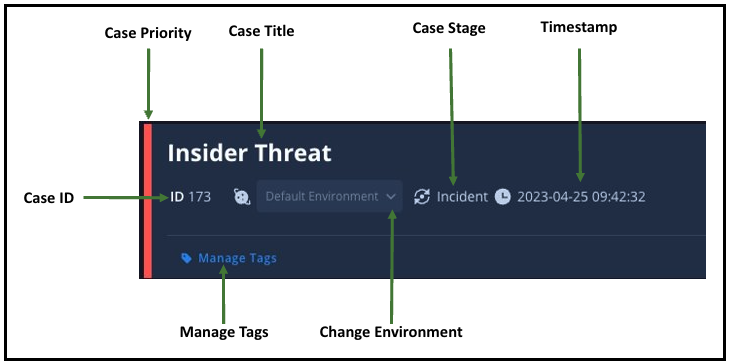
Look at the left edge. A red bar, and the only thing in the world that tells you it means priority is a green arrow on a documentation page. The stage is a circular arrow. The time is a clock. In the product, all three are marks with no words, and this image is where the words live.
Hold on to that red bar. Option 0, one of the six designs in How it was made, put a red bar down its own card to mean Malicious, and failed a gate for it.
The Case Wall — the running record of everything that happened to a case — carries eight more, and these are Google’s images too. Not one of them carries a word.


In the order shown, they mean: actions taken on alerts · case status changes · task details · a comment · insights · a pinned chat · a favourite · the sort order. The screen says none of it. The pairings come from one documentation page, and there is nothing on screen that would get you there.
In the integration as published, that verdict arrives as verdict: MALICIOUS — a string inside a JSON tree, five selections into the case by the AI agent’s count of the published screenshots. The Case Wall entry for the same action says the analysis was returned. It never says what it concluded.
So: hard to find — and once found, silent about what it covered or what came after.
You can try that. The prototype on the case study page has a Today · no card state that reproduces it: the verdict exists only as raw data, behind the playbook’s results.
A guest cannot design what it does not control, so the constraints come before the criteria. The host documents exactly three layers, and only the third belongs to the vendor.
| Layer | Who controls it | What that means here |
|---|---|---|
| The console | Fixed | Case queue, case header, the priority bar, Escalate and Close, the tab strip, and what the host’s own widgets show, such as Alerts and Entities highlights. A design that needs any of this to change is answering a different question |
| The Overview grid | The customer’s admin | The admin decides which widgets exist, where they sit and how wide they are. A vendor cannot assume its card is installed at all, or that it sits where the vendor drew it |
| The widgets themselves | The vendor | HTML (display-only, as far as the docs say), Key value, Insights, Quick Actions and Pending Actions (the playbook pauses and asks). Plus a Case Wall entry and a playbook action result, which always exist |
The constraint that shaped the card most: the HTML widget displays, it does not write. Anything that changes the case has to be a Quick Action button or a Pending Action choice. So “accept or override” is not a button a designer may simply draw — it is a documented action type or it does not exist. Option 0, one of the six designs in How it was made, drew it anyway, and failed a gate for it.
And because the admin owns the grid, the card cannot be the only place the verdict lives: whatever a vendor writes into the Case Wall has to carry it alone, for every tenant that never installed the widget.
The eight rules aren’t invented. The two consoles checked already do much of this for the AI they build themselves, Google’s more fully than Microsoft’s. What they don’t do is extend the same standing to a guest’s.
| Google’s own agent | Microsoft’s own AI | Wiz’s verdict in Google’s console | |
|---|---|---|---|
| Where it shows | A banner in the case summary | The incident page, as it opens | Deep in raw data (the published screenshot) |
| When it ran | Completion time on every entry | Not stated on the card | Only inside the raw data |
| What it used | Its reasoning and supporting data | Its alert limit, stated | Not carried |
| When the case changes | Each re-run kept as its own entry | Reused only if the incident “didn’t change significantly” | Nothing. A snapshot |
Sources: Google’s agent documentation (the case-summary banner is on Enterprise tiers) · Microsoft’s incident-summary documentation. Splunk, Palo Alto and CrowdStrike weren’t checked; their AI documentation is mostly behind logins.
Google’s own AI gets a date. The guest AI gets a JSON field. Microsoft’s “didn’t change significantly” check is this card’s Outdated state, already shipping — for the host’s own AI. The card asks for parity, not for something new.
And it points at what comes next. Google’s agent auto-investigates cloud audit-log alerts, which is the kind of alert that made the bucket public. So in that case, Google’s AI could well reach its own verdict on the new alert — true positive, in its vocabulary — while Wiz’s earlier benign sits in the raw data, in a different vocabulary, with nothing to reconcile them. Two AIs, one case is the problem this card doesn’t solve yet.
The audit was committed on 17 September at 18:13. Google’s release note for a revamped version of that view is dated 18 September.
The layout dated. All eight rules still applied, and two of them got sharper.
Rule 1 gained a second width — the new experience has a resizable preview drawer beside the queue, so “the view the case opens to” now means two densities. Rule 7 gained the migration case: when a tenant moves to the new experience, custom widget configuration does not carry over, and an admin has to copy it across by hand. For the length of that migration, the plain text entry is the only thing the vendor still owns.
The count was not re-pointed at the new view. It publishes no screenshots, and no third-party verdict has been shown inside it, so a count there would be assertion rather than evidence. What changed is recorded instead, and the audit says at the top which experience it covers.