One vendor’s verdict, another vendor’s case
An AI agent calls it benign, with high confidence. The alert that contradicts it is already in the case — and the analyst reading both works in a different vendor’s console. This is where that verdict should live, and what it owes the console it lands in. The prototype runs on this page.
A weather forecast tells you two things without being asked: when it was issued, and how sure it is. That is what makes one usable. You can look at a forecast from this morning and know to check again.
A company buys two security products. One of them watches its cloud and runs an AI that decides whether something is an attack. The other is the screen a human sits in front of all day, working through alerts and deciding which ones are worth waking a colleague up for.
The AI’s answer has to get from the first product to the second. It arrives with neither of the forecast’s two things. It turns up as a line of code, five clicks from anywhere a person would look, and when they find it, nothing on the screen says what the AI looked at, when it stopped looking, or why its rating disagrees with the one the screen is already showing.
The timing is the part that bites. A case keeps collecting new alerts after the AI has finished with it. So an answer that was right when it was written can be wrong by the time a human reads it — and unlike a forecast, it never says when it was written.
This case study is what I did about that. I counted what that screen actually explains and what it leaves you to guess. I wrote down what a good answer would have to do, before designing anything. Six versions were drawn against those rules and scored against them. I built the one that survives the hardest case, and you can use it further down this page. Then I wrote the part that outlasts both products: what any company’s finding owes the screen it turns up on, when that screen belongs to someone else.
Contents · 9 sections · ~14 min
Wiz’s Blue Agent investigates a cloud threat and reaches a verdict. The analyst who has to act on it is in Google Security Operations — working a case assembled from alerts the agent never saw.
On one of the cases in this study the agent says Benign, with High confidence. Forty-three minutes later, still inside the same case, someone enables public access on the storage bucket using the same key. The agent never saw it, because the agent had stopped reading.
The agent is not wrong. It is just done. Everything below follows from that: a finding that was true when it was made, landing on a screen where the facts have moved on.
In the integration as published, that verdict arrives as verdict: MALICIOUS — a string inside a JSON tree, five selections into the case and four levels down. The Case Wall entry for the same action says the analysis was returned. It never says what it concluded.
On the same screen three signals disagree at once and nothing reconciles them: the host’s own priority bar is yellow, which its documentation defines as Medium; the alert is named “MEDIUM SEVERITY ALERT”; and the agent reports severity: HIGH. The analyst is left holding three ratings from two vendors and no stated rule for which one governs.
So: hard to find, and once found, impossible to date.
You can try that. The prototype in section 06 has a Before state that reproduces it exactly. Open a case and go looking.
Before arguing that a console is hard to read, count it. A number can be disputed; an adjective cannot.
So I wrote the counting rules first — one row per mark per place, colours that vary get their own row, near-universal conventions count as readable but are flagged — then counted every icon, badge, colour and label in one case investigation view. The count is a script, not a claim: it recomputes from the table, so anyone who disagrees with a row can change it and watch the total move.
Fifty-one of those 72 are marks an analyst cannot read without leaving the console. Of the 21 that do explain themselves, 13 do so only because they are universal — an ×, a +, a green check. Strip those and eight marks out of 72 are labelled on screen.
Two things have to be said in the same breath as that number. Static screenshots cannot show tooltips, so some of the 28 may speak on hover; the audit lists exactly which rows to check in a live tenant. And the console does one thing here that nothing else in the study does: the Security Graph, one click away, carries its own legend in the product, naming every shape and colour it draws.
What “explained only in the docs” looks like
This is the case header, as Google’s own documentation draws it. The green arrows are the documentation’s; the product has none of them.
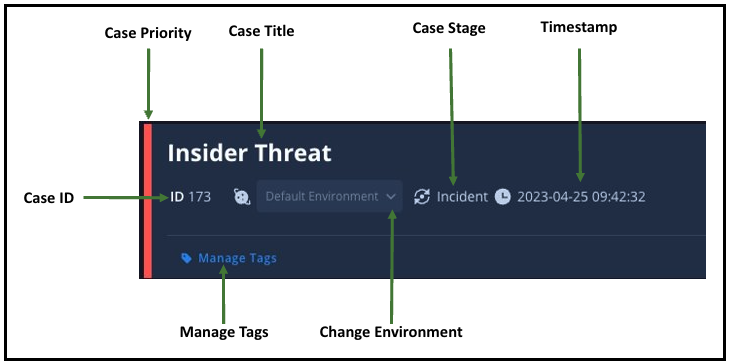
Look at the left edge. A red bar, and the only thing in the world that tells you it means priority is a green arrow on a documentation page. The stage is a circular arrow. The time is a clock. In the product, all three are marks with no words, and this image is where the words live.
Hold on to that red bar. It comes back in section 05, when the version of the card I built myself borrowed the same device and failed a gate for it.
The Case Wall — the running record of everything that happened to a case — carries eight more, and these are Google’s images too. Not one of them carries a word.


Between them they mean: actions taken on alerts · case status changes · task details · a comment · a pinned chat · a favourite · insights · the sort order. The audit pins two of them — the gear is the actions, the folder is the status changes. Working out which of the other six is which takes a trip to one documentation page, and there is nothing on screen that would get you there.
This is the design decision, and it happens before anything is drawn.
A design decision is about setting the criteria to evaluate which idea wins.
— the working rule for this studyFirst, what is actually movable
A guest cannot design what it does not control, so the constraints come before the criteria. The host documents exactly three layers, and only the third belongs to the vendor.
| Layer | Who controls it | What that means here |
|---|---|---|
| The console | Fixed | Case queue, case header, the priority bar, Escalate and Close, the tab strip, and the host’s own Alert timeline and Entities widgets. A design that needs any of this to change is answering a different question |
| The Overview grid | The customer’s admin | The admin decides which widgets exist, where they sit and how wide they are. A vendor cannot assume its card is installed at all, or that it sits where the vendor drew it |
| The widgets themselves | The vendor | HTML (display-only, as far as the docs say), Key value, Insights, Quick Actions (up to six buttons) and Pending Actions (the playbook pauses and asks). Plus a Case Wall entry and a playbook action result, which always exist |
The constraint that shaped the card most: the HTML widget displays, it does not write. Anything that changes the case has to be a Quick Action button or a Pending Action choice. So “accept or override” is not a button a designer may simply draw — it is a documented action type or it does not exist. Option 0 drew it anyway, and that is one of the two gates it failed.
And because the admin owns the grid, the card cannot be the only place the verdict lives: whatever a vendor writes into the Case Wall has to carry it alone, for every tenant that never installed the widget.
Three hard gates first. An option that fails one is out, whatever else it scores.
- The guest never overwrites the host. Status and severity sync both ways between the two products, so one silent write changes two systems at once. Pass or fail, not a degree.
- Buildable from what the host already lets a guest use. A dashboard widget, a case-wall entry, a playbook result. Anything that needs the host to change its own chrome is solving a different problem.
- It passes the audit in section 02. Every mark the card adds is legible on screen, and it reuses no glyph the host already uses for something else.
Then six weighted criteria, each scored across five dimensions — user impact, failure severity, frequency, strategic alignment, competitive leverage — to earn its weight rather than be assigned one.
| Criterion | Weight | Because |
|---|---|---|
| Found on the view the case opens to | 3× | An unfound verdict plays no part in the decision |
| Confidence that changes the card | 3× | People over-rely on confident-looking automated advice (Parasuraman & Manzey, 2010) |
| Says what it saw, and when | 2× | Alerts can join the case after the analysis ran |
| Accept or override, consequence shown first | 2× | One disposition can change two systems |
| Evidence checkable inside the case | 2× | The conclusion is currently a truncated string |
| Disagreement between the two severities shown | 2× | Nothing on screen reconciles them today |
Committed at 17 Sep, 18:17 — ninety minutes before the first option existed, including the one I built myself. A seventh criterion was cut before anything was scored, because every option satisfied it, and a criterion that separates nothing cannot judge anything. It became a briefed requirement instead, checked and reported.
Five were generated by an agent working from a written brief. The brief is the work; the generation is a method note.
The brief carried the criteria, the three gates, the host’s documented extension points, the synthetic case data and the six states every option had to draw — including the ones nobody enjoys drawing: analysis pending, analysis failed, and no widget installed at all. Each run got the same brief and one difference in how it was seeded. One run was given no direction beyond the rules and the data.
The sixth is Option 0: the original ask made literal — verdict, confidence, evidence, provenance, accept and override — built before the criteria were applied to anything. It is mine, and it is in the set so the criteria have something unexamined to be measured against.
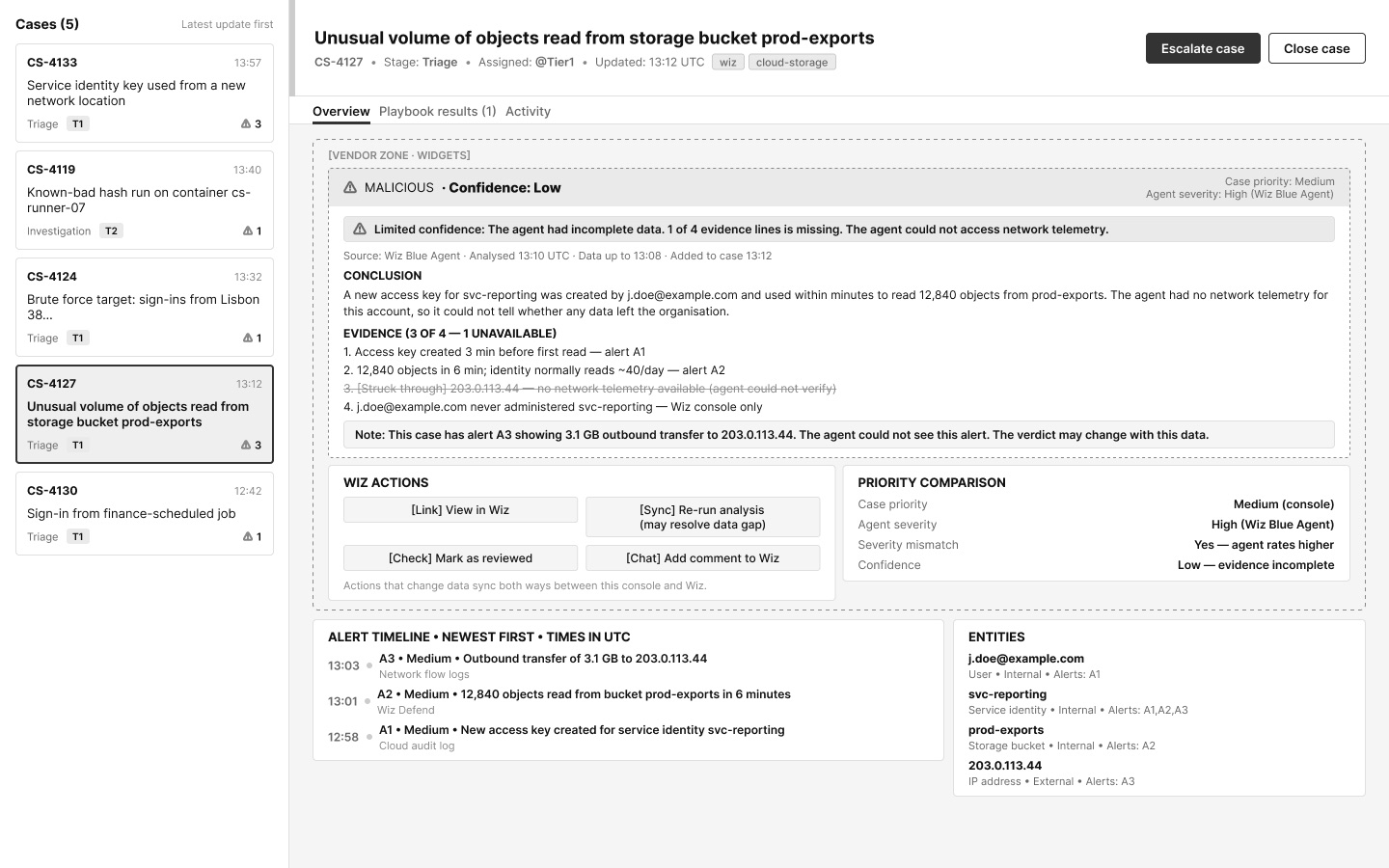
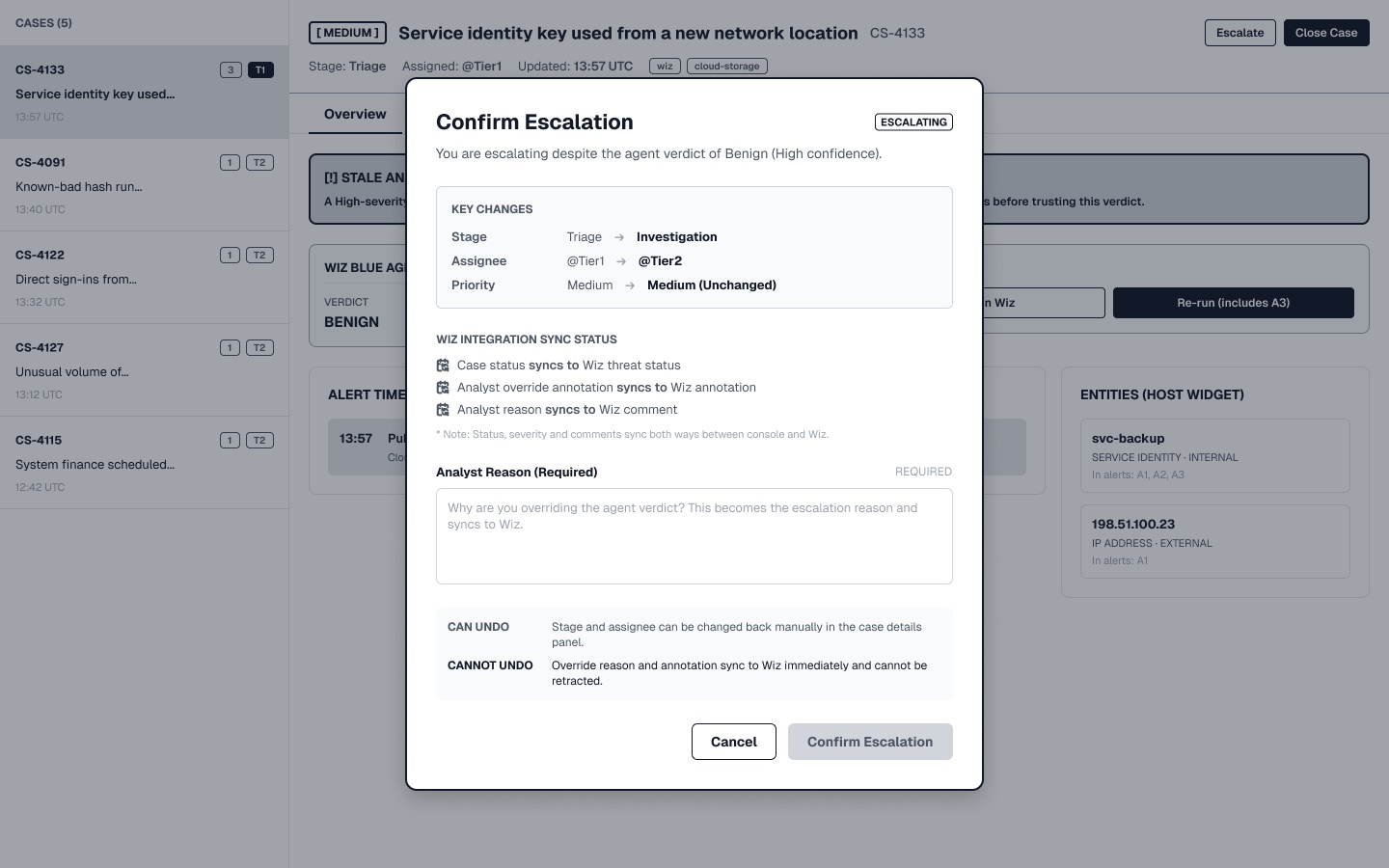
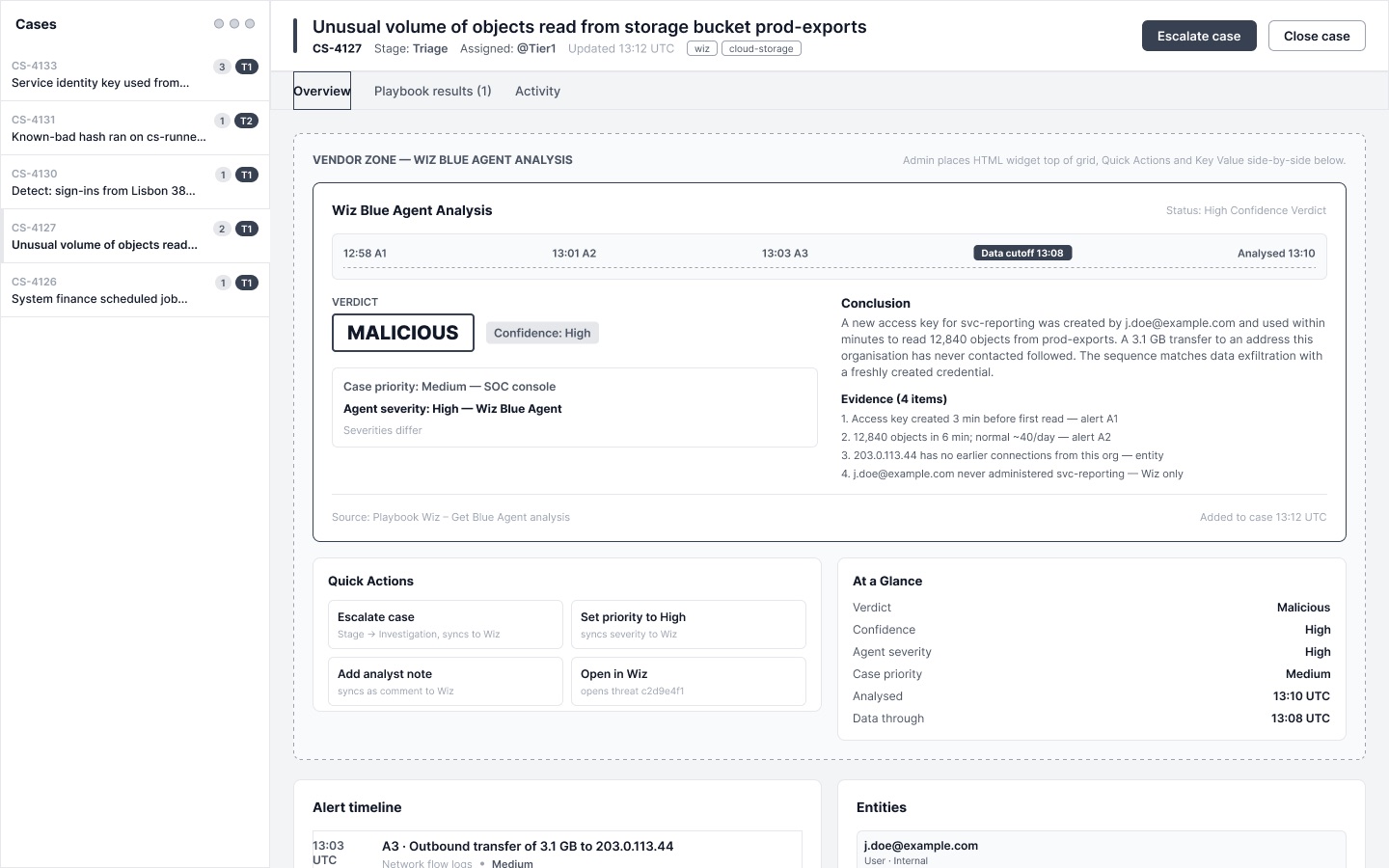
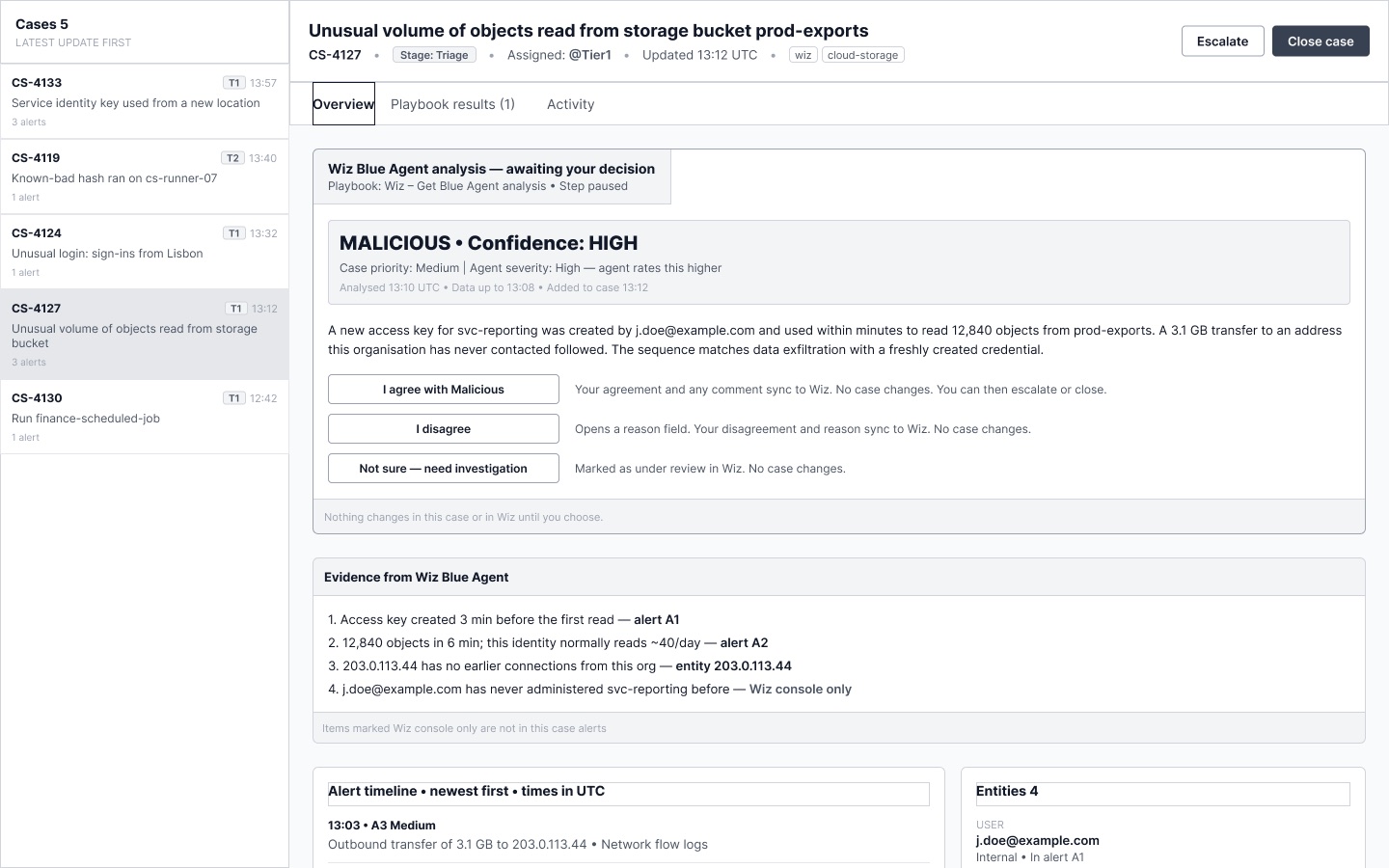
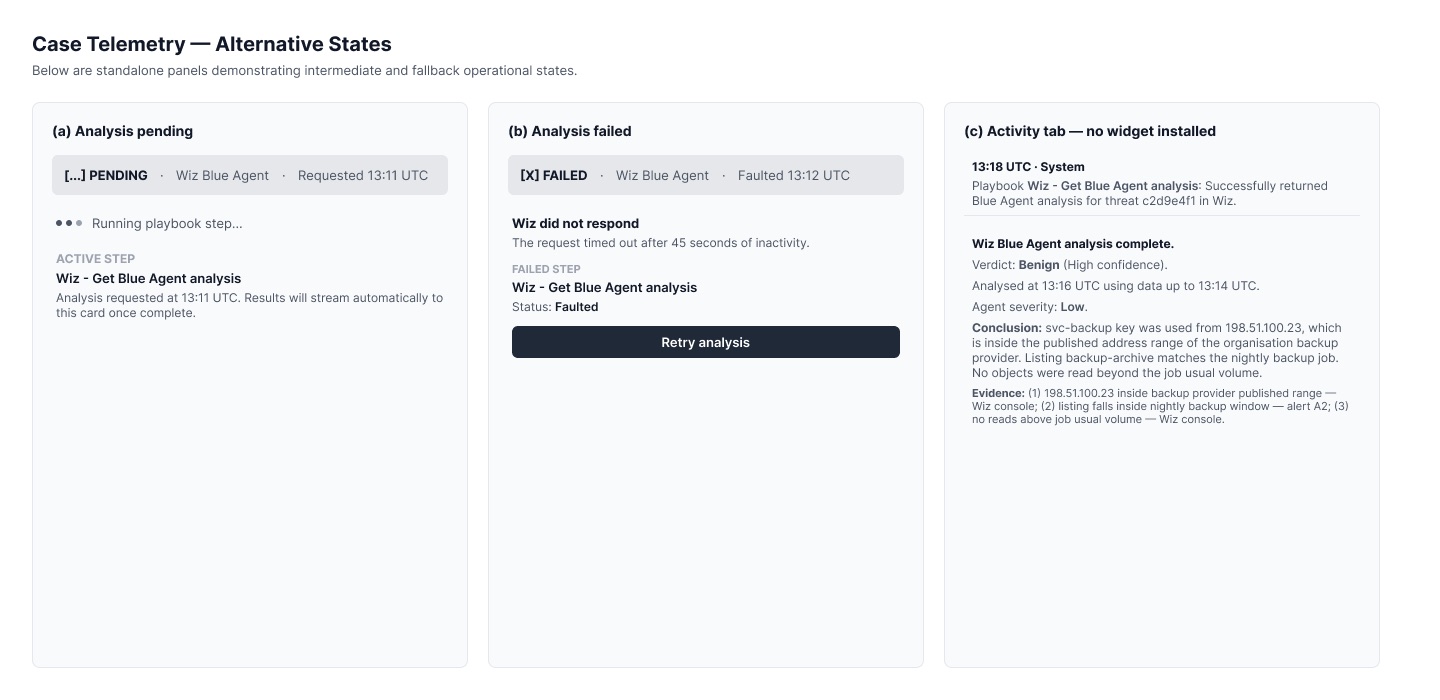
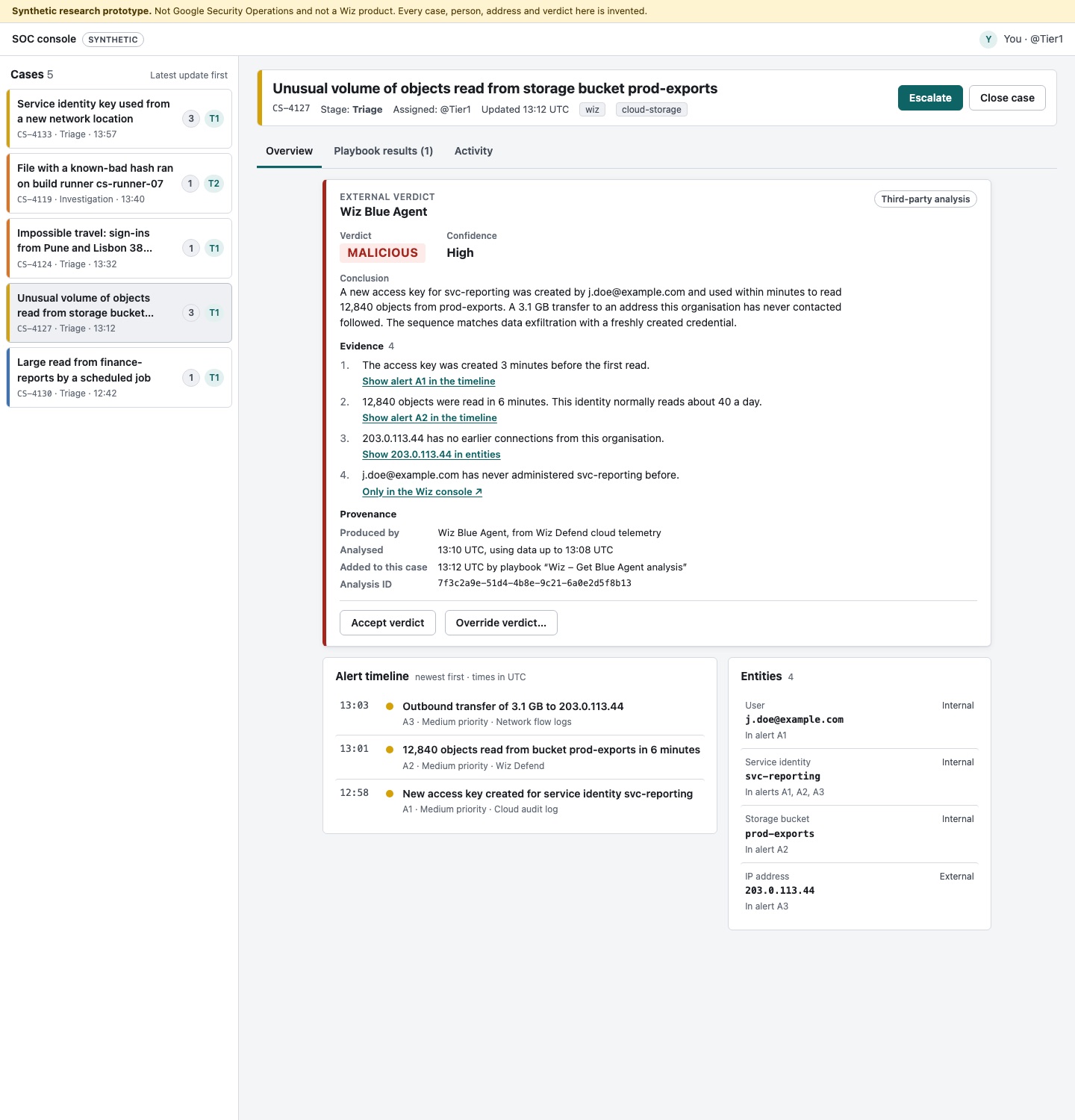
Two scorers worked the same rubric independently. Neither could see the other’s notes.
They agree on first place and disagree on second. Neither margin clears the 10-point close-call rule fixed before any option existed, so no winner is declared. R5, the run given no direction at all, leads both passes; the runner-up changes identity between them.
Two findings do more work than the ranking.
- Both scorers found the same hole, independently and in near-identical words. Low confidence changes what every card says and what almost none of them offers. One option re-aims its action at the gap. None withdraws it. Three leave “Escalate to Tier 2” sitting unchanged beside a gap they have just drawn.
- The option built literally from the original ask came last in both passes, and it failed a gate. It put an unlabelled colour bar down the card’s left edge, in the same column as the host’s own priority bar — the red one from section 02, where red already means Critical. That is the exact class of error the count in section 02 exists to catch, and it was my build.
What the refusal forced. With no winner, the answer could not be a coronation. It is a hybrid: the parts that scored best, wherever they came from. And three things no option produced — which the criteria file had predicted, in writing, would not appear unless briefed. They were not briefed. They did not appear.
One case, four moments. It runs on this page.
The agent calls CS-4133 Benign with High confidence, using data up to 13:14. At 13:57 an alert joins the case: public access enabled on the bucket, using the same key. That is 43 minutes after the data the verdict used, and 41 minutes after the analysis itself. It is in the case. It is not in the card.
Start with Before · no card and try to find what the agent concluded: it is in Playbook results › step 3 › View raw result, which is where the audit found it. Then switch to Found. On Outdated, accept the verdict and wait twenty seconds.
| Moment | What the card does |
|---|---|
| The verdict lands | Names the agent, the data it read, the time it stopped reading, and both severities with the system that issued each |
| A newer alert arrives | “Outdated. Alert A3 arrived 13:57 UTC, 43 minutes after the data this verdict used. The agent has not seen it.” With a control that goes there |
| The analyst decides | Every action carries its consequence before it is pressed. The record names what was accepted. Undo is a control, not a sentence about undo |
| The vendor changes its mind, six minutes later | The change announces itself. Read it, and the card swaps in the new verdict, its new severity, its new claims and its new data cut — keeps the earlier conclusion on the record — and the outdated warning correctly clears |
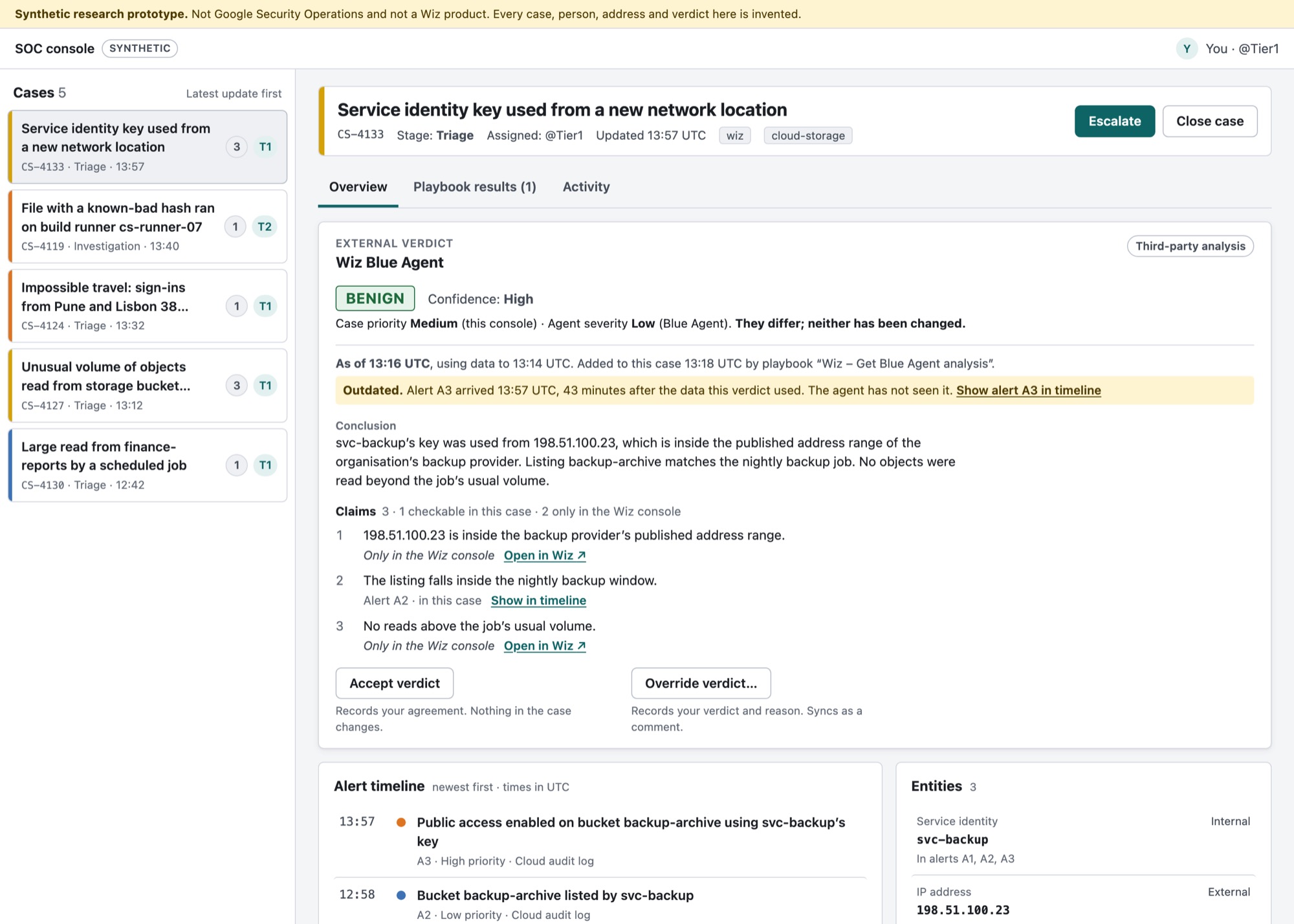
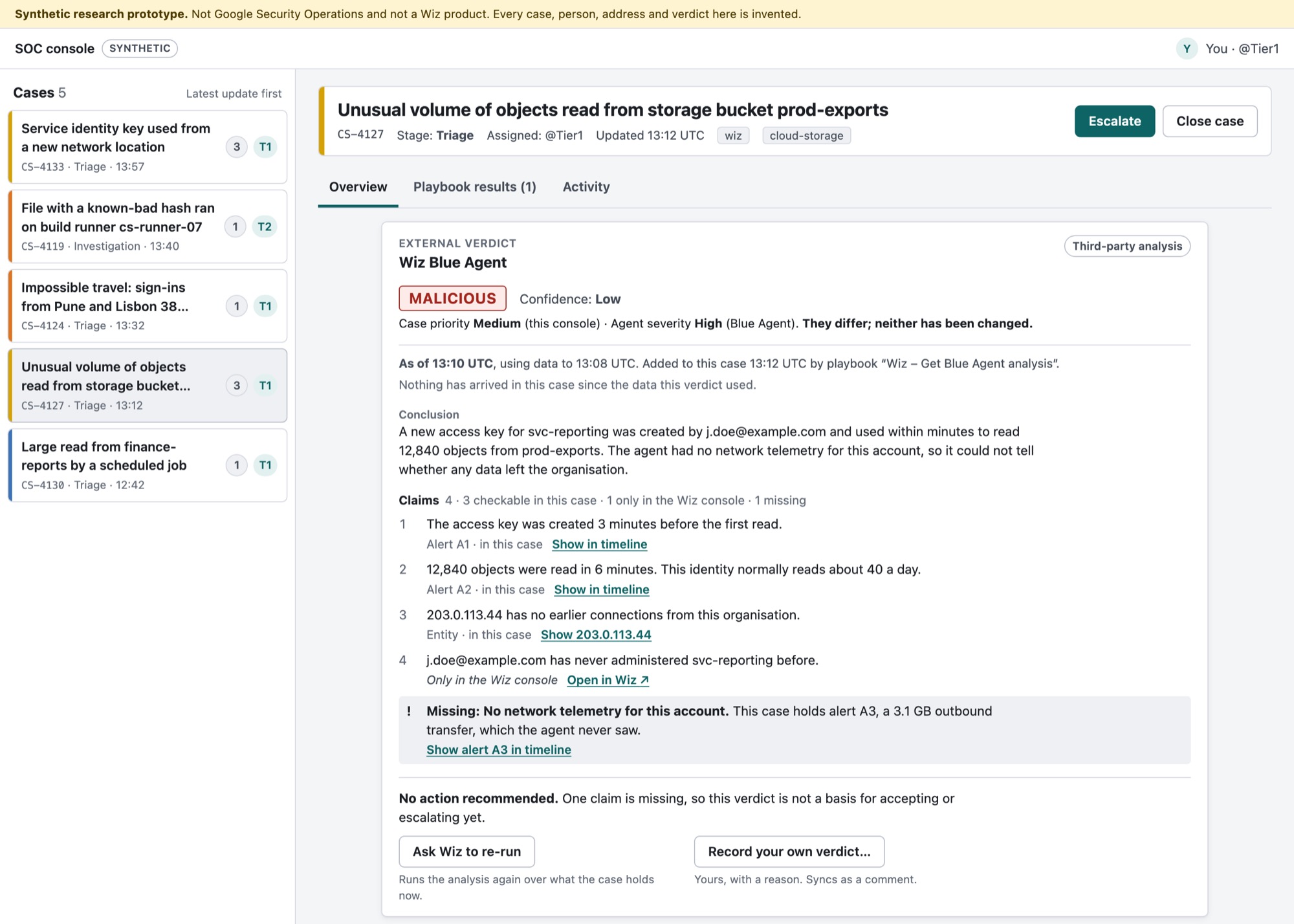
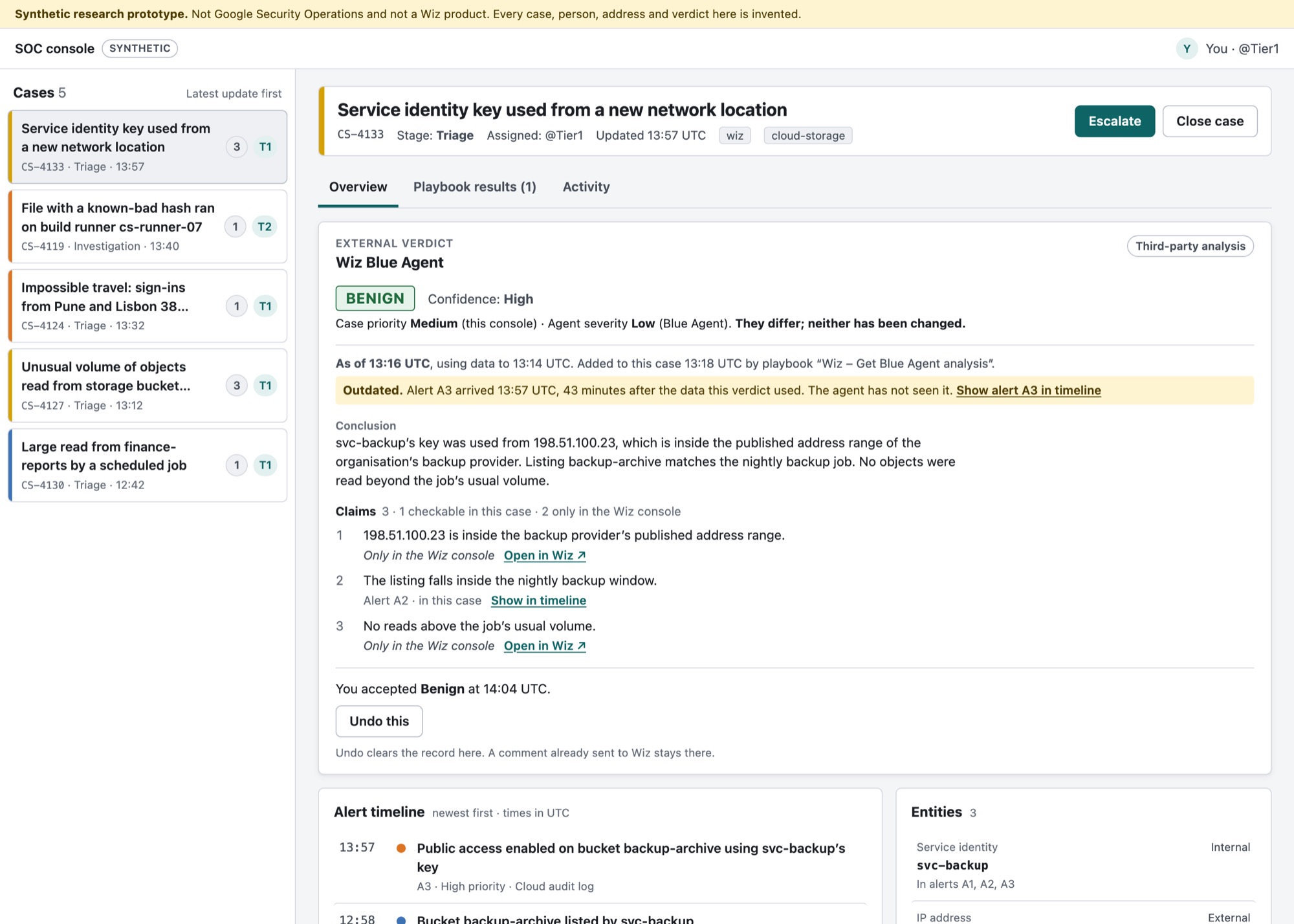
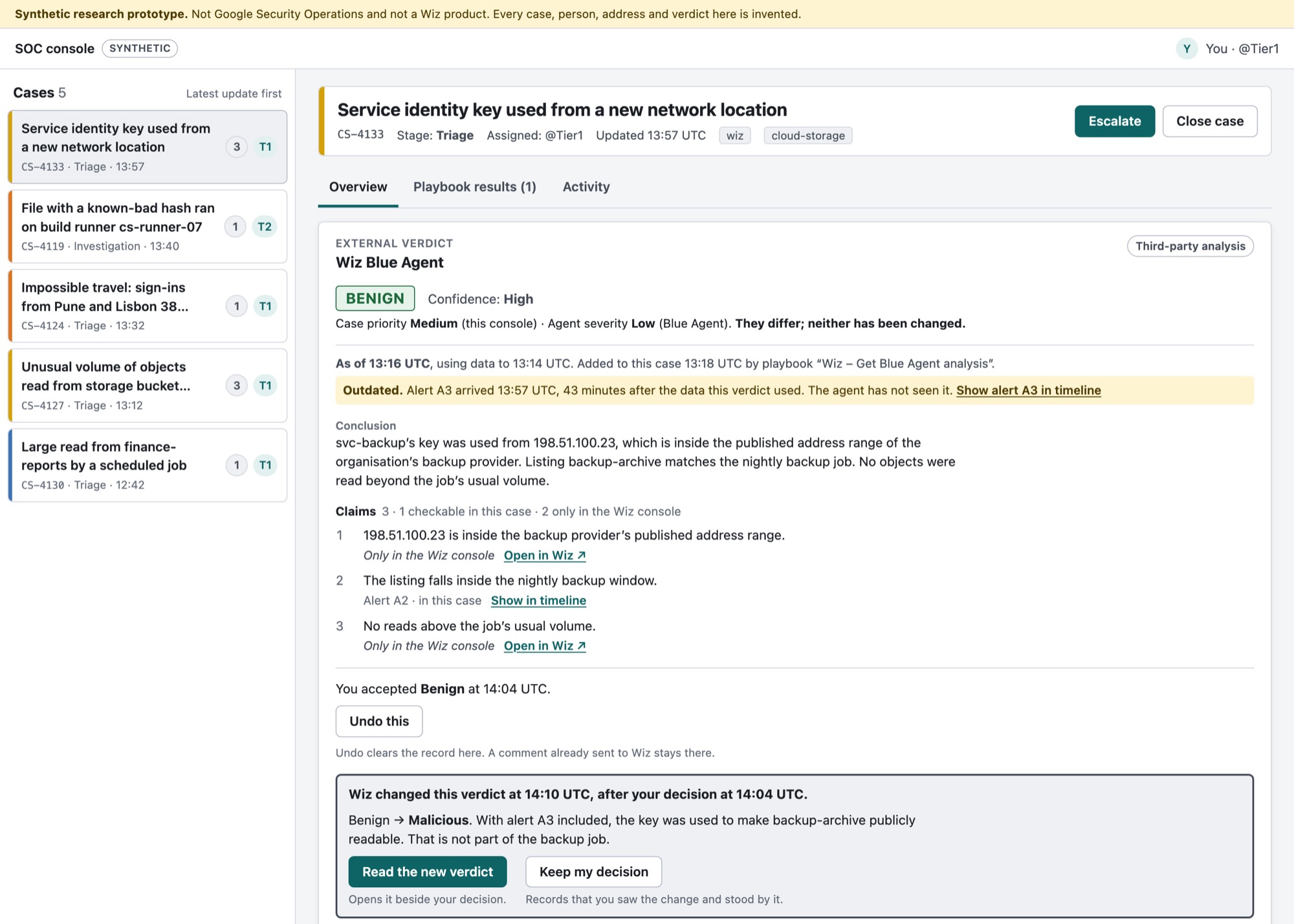
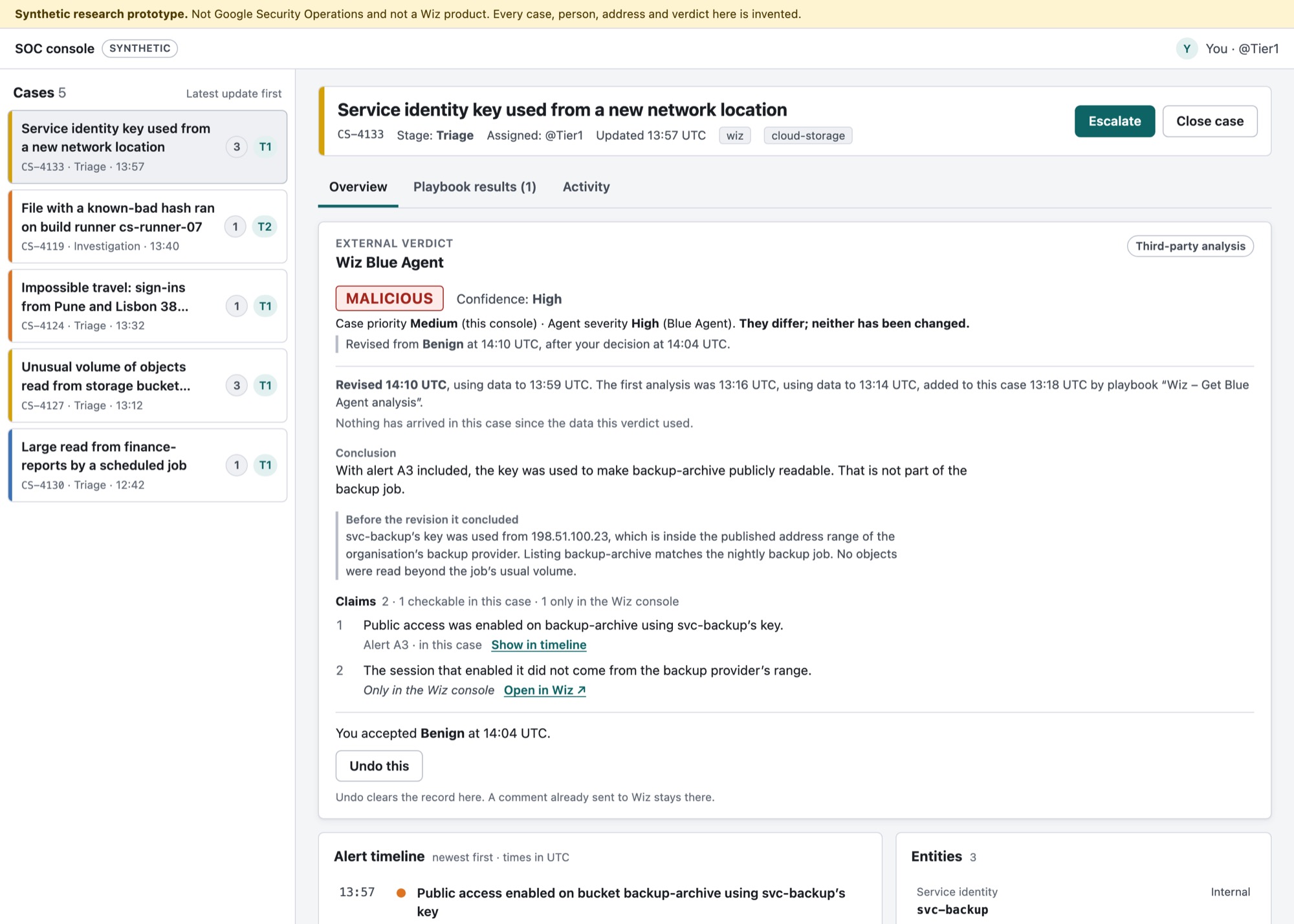
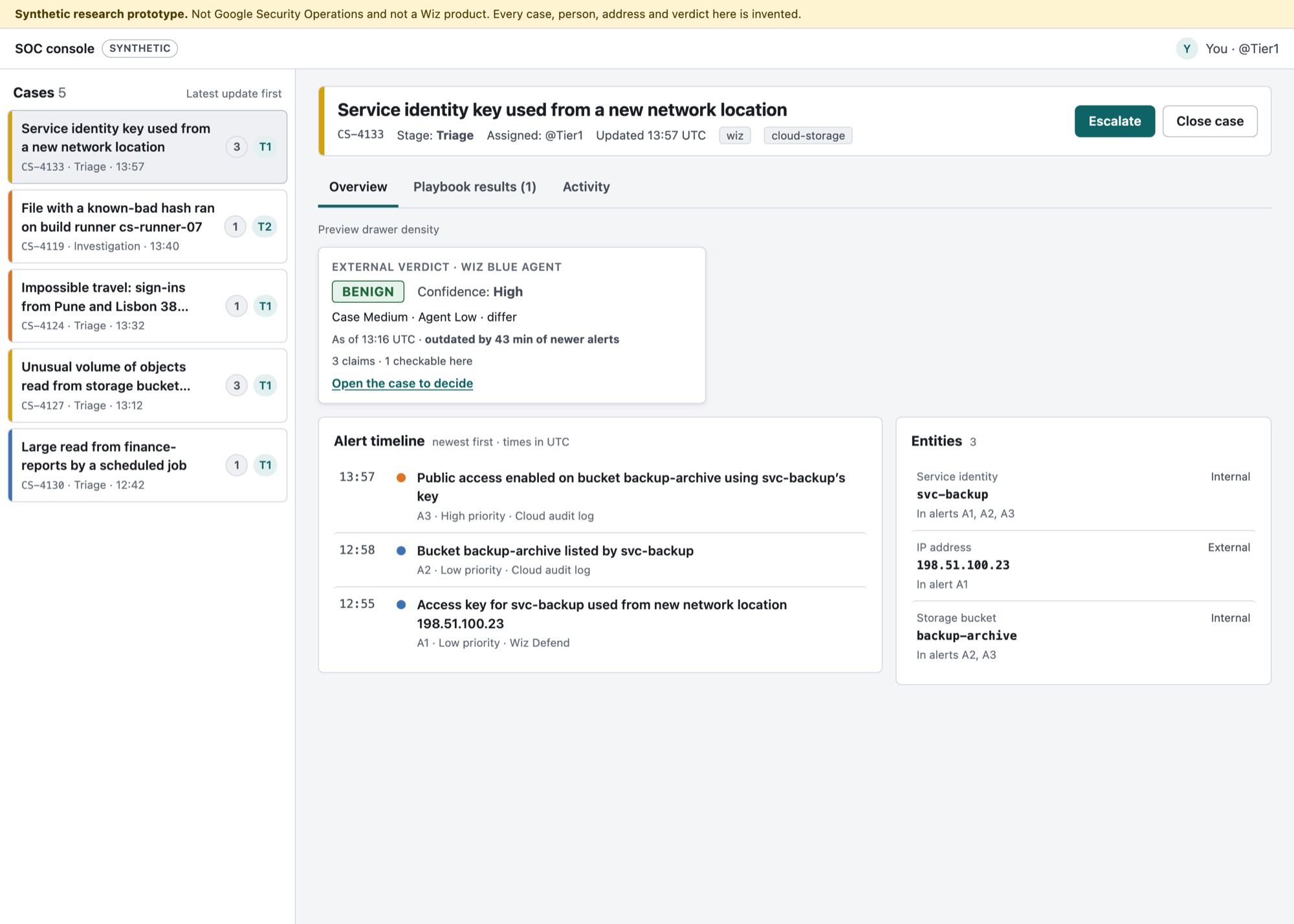
What it refuses to do. No colour in the host’s priority column. No host field changes without an explicit act. One decorative mark on the whole card, and it sits after words.
The card is then put through the study’s own gate, mechanically. Twelve checks, run by a script on both cards: 12 of 12 for this one, 5 of 12 for Option 0. A check that only ever passes proves nothing, so it runs on my failed build too, and names seven specific failures there.
→ v1 12/12 · Option 0 5/12
The integration will change. Both vendors will change. This is what is left.
A verdict produced by one vendor is read inside another vendor’s product, by an analyst who owes their attention to the case, not to the agent. The agent is a guest. These are the obligations that come with being one, each traced to a row in the count or a criterion from section 03.
- Say what you saw, and when.
- Declare what you could not see. A missing input is part of the finding, not a footnote.
- Let the host’s claim stand beside yours. Never silently overwrite. Never silently defer.
- Make every claim checkable in the host’s own objects.
- Change nothing without an explicit human act — and say what the act will do, in both systems, before it happens. Name what cannot be undone.
- Explain your own marks. Every icon, badge and colour on your surface carries a visible label, and you never reuse a glyph the host already uses for something else.
Then the product moved, and it was an accident
The audit was committed on 17 September at 18:13. Google’s release note for a revamped version of that view is dated 18 September. One day.
The layout dated in a day. All eight rules still applied, and two of them got sharper.
Rule 1 gained a second width — the new experience has a resizable preview drawer beside the queue, so “the view the case opens to” now means two densities. Rule 7 gained the migration case: when a tenant moves to the new experience, custom widget configuration does not carry over, and an admin has to copy it across by hand. For the length of that migration, the plain text entry is the only thing the vendor still owns.
I did not re-point the count at the new view. It publishes no screenshots, and no third-party verdict has been shown inside it, so a count there would be assertion rather than evidence. What changed is recorded instead, and the audit says at the top which experience it covers.
No analyst has used this. n = 0. The design rules below stand as argued, not as tested.
The protocol is written — consent, three tasks, time to first correct action, five debrief questions, a scoring sheet. The prototype scores its own sessions and exports them, and a self-serve link needs no calendar and no facilitator. That is the next thing that happens, and whatever n it reaches gets printed first, in the findings.
What would make this wrong
Written before any data, so it cannot be adjusted afterwards.
- If analysts find the verdict just as fast with no card at all, the count overstated the problem and the card is solving something smaller than I claimed.
- If they catch the stale verdict without the card, freshness belongs in the host’s timeline, not in a guest’s widget, and rule 2 is aimed at the wrong surface.
- If the low-confidence card makes them slower without making them more accurate, withdrawing the recommendation is friction rather than safety, and it goes.
What I’d ship first
The freshness line and the claim-level checkability. Both are cheap, both work in a plain text entry as well as in a widget, and between them they carry the two failures the count actually found: a verdict you cannot date, and a claim you cannot follow.
What I’d cut
The preview-drawer density, until someone confirms a vendor widget renders in that drawer at all. The docs do not say, and I could not check without a tenant. It is drawn because rule 1 demands it, not because it is known to be buildable.
What breaks at scale
Claim-level checkability assumes the agent’s claims map onto objects the host holds. On a case with one alert that is easy. On a case with 500 detections and 5,000 events — the host’s own documented ceiling — “checkable in this case” stops being one click and starts being a search, and the card would need to say which.
A clean narrative is not the same as a tidy process. The prose above reads forward; this is the order things actually happened in, and who decided each one.
| Date | Decided by | Decision | What it changed |
|---|---|---|---|
| 17 Sep | Omkar | Write the hypothesis before gathering the evidence | The audit could refute it, and partly did |
| 17 Sep | AI, reviewed | Publish the counting rules before counting | A count that can be disputed, and re-run by script |
| 17 Sep | AI, reviewed | Commit the criteria at 18:17, before any option exists | The claim is a timestamp, not a sentence |
| 18 Sep | Omkar | Judge directions to develop, not finished candidates. Scope: guest only | Findings about the host stay findings, never proposals |
| 18 Sep | Omkar | Six criteria, not seven | A criterion every option satisfies cannot separate them |
| 22 Sep | AI, reviewed | Refuse to re-point the audit at the revamped view | No screenshots there; a count would be assertion |
| 23 Sep | AI, reviewed | Uphold the gate failure against Option 0 — my own build | The version built from the original ask came last |
| 23 Sep | Omkar | Mix the top options rather than crown one | The answer is a hybrid, and the fitting is disclosed |
Five of the six options were machine-generated, two AI scorers scored them and the numbers above are theirs. What is mine is the problem, the count, the criteria, the gates, the scope, the three additions no option produced, and every judgement about what the scores meant. The page says which is which because concealing it is the actual red flag.