How I work · Part 1 of 3
My design method, written as steps AI follows.
Five steps every AI follows, in any order: real work often goes back a step or skips ahead. The AI does the bulk of each step, and I make the decisions.
- Frame
frame-to-keyframeTurns a vague request into one clear problem, before anything is drawn.For example: This page started from one question a reviewer might ask: if AI drafts, what is the designer for? - Explore
adaptive-ideationBorrows ideas from other fields, then mixes them into new ones.For example: 16 ideas for showing where a click on a tab will land. Four of them:



- Decide
criteria-first-evaluationSets the bar before scoring, scores twice, and hands close calls to me.For example: the rubric behind a tie, 94.1 against 93.5. See it - Check
state-coverage-sweepTries every situation: empty, too many, long names, high contrast.For example: In high contrast, every tab looked selected. Found and fixed.Before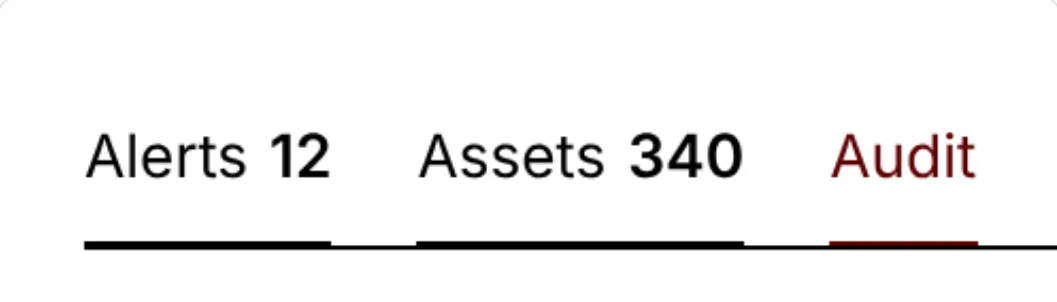 After the fix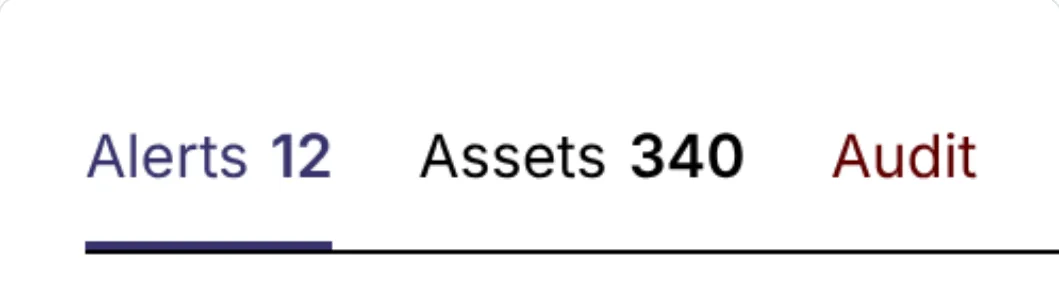
- Tell
my-writing-style · visual system · dataviz · canvasWrites in my plain voice and draws in my colours and type.For example: The words and pictures on this site.
What I catch goes back into the skills, so the next round starts smarter.
The key to Decide
The rubric is set before anything is scored.
Eight things a good answer must do, each weighted. Two passes, scored separately. When the result is too close, the call comes to me.
The rubricSet before anything was scored · 85 points
- Shows where the click will land, from any distance
- Pointing and choosing look different, even without colour
- Stays quiet when the mouse sweeps past
- The click does what the hint promised
- Noticed without effort
- Feels calm and sure
- Works for everyone: keyboard, zoom, high contrast
- Fits how Vela is built
Scored twice, separatelyOut of 85
| Pass 1 | Pass 2 | Mean | |
|---|---|---|---|
| A · Grow in place | 81 | 79 | 94.1% |
| B · Travel across | 80 | 79 | 93.5% |
Gap: 0.6 points. The skill's rule: under 10 points, a score can't decide. So it came to me, and I chose A by watching both.