Omkar KhadamkarAll work

VMware · NSX networking software · 2021 to 2022

Showing which of 32 network locations has a problem.

One screen for 32 network locations tested better than the world map and shipped as the default view.
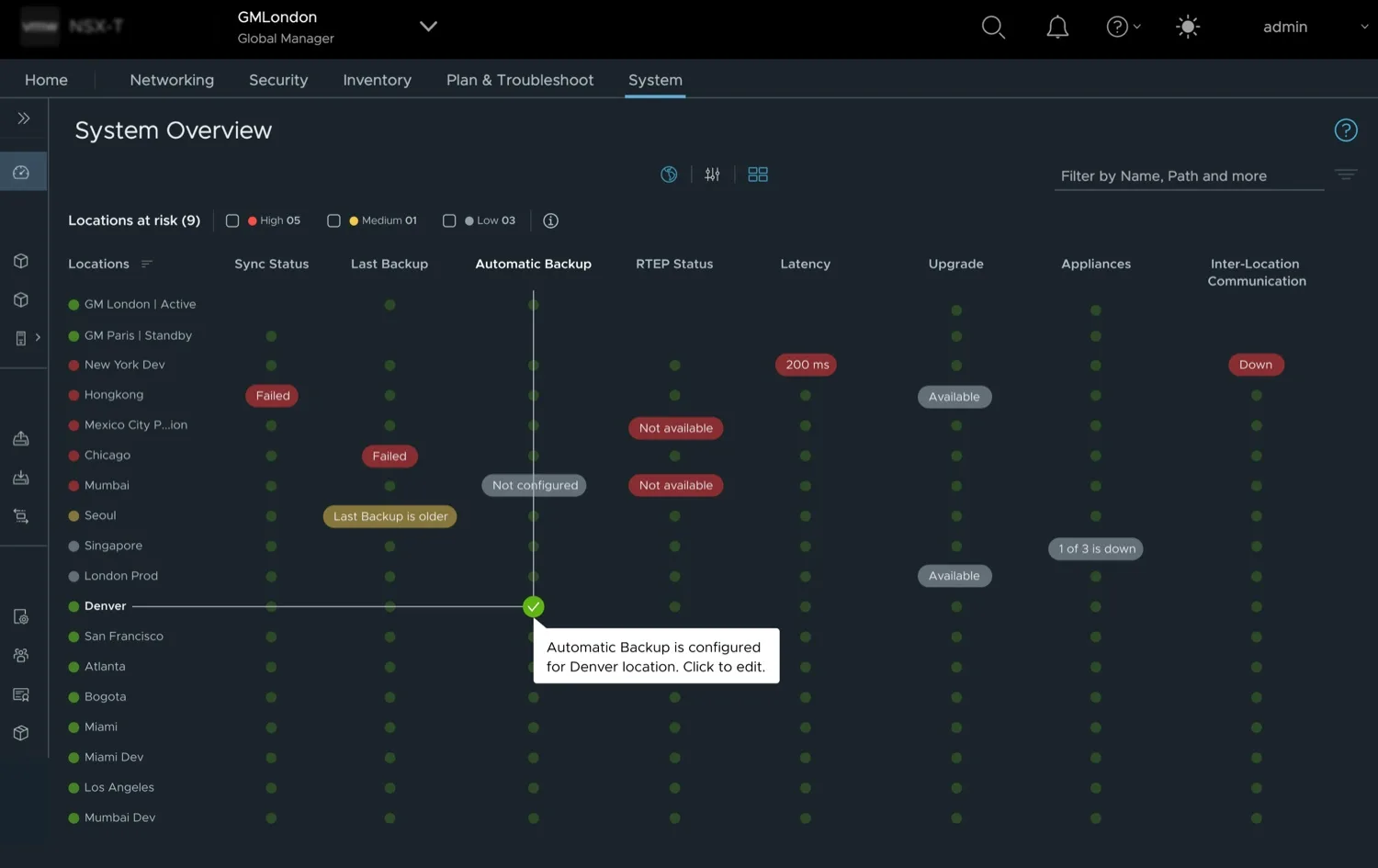
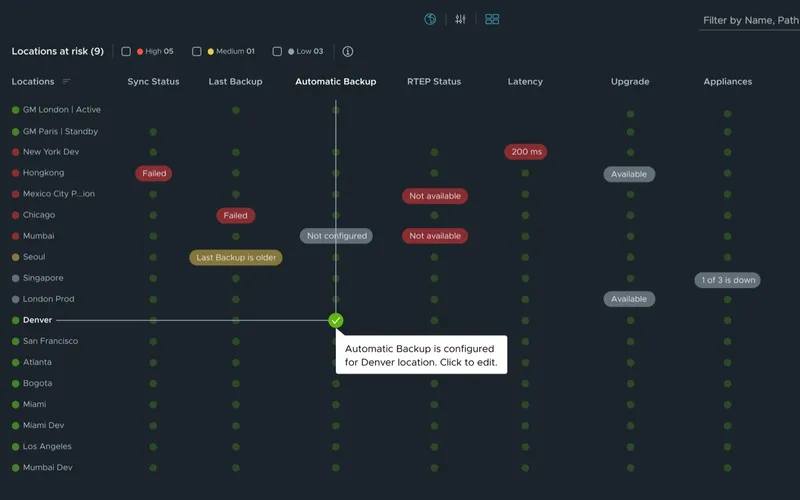
The fretboard view of NSX System Overview: about twenty locations as rows and eight checks as columns (sync, last backup, automatic backup, RTEP, latency, upgrade, appliances, inter-location communication). Healthy checks are small green dots; problems are labelled pills such as Failed, 200 ms, Not available and Down. A crosshair runs from Denver to the Automatic Backup column, with a tooltip offering to edit.
The fretboard: every location on one screen, problems in words where row and column cross.Design concept · lab data
My decision

Show the worst problem, not the average, so nothing can hide. Then show why.

Go deeper 2 min

A status screen for network admins who manage many locations at once. It shows each location's worst problem on one screen. It did better in testing and shipped as the default view.

  • Role Lead designer, from research to spec
  • Timeline 8 weeks, research to design
  • Tested 43 people, two designs head to head
  • Tools Maze for the test
  • Shipped Default view in NSX Global Manager
The problem

Each location had its own big card. Two cards filled the screen, and there were 32 locations to check.

What shipped

The grid view, which we called the fretboard, as the default. The world map stayed one click away.

My part

The research, the concepts, the test and the rule for summing up status. First-named inventor on a published patent application, US 2025/0036264.

  1. 01One card per location worked for two locations, not for 32.The moment
  2. 02Admins mainly needed to know one thing: is anything wrong?Under the brief
  3. 03The design that tested better became the default.The decision
  4. 04Each location shows its worst problem, not an average.The rule
  5. 05Shipped as the default view, and published as a patent application.Shipped
  6. 06The grid works for 32 locations. A thousand would need a different starting point.What I'd change

01The moment

One card per location worked for two locations, not for 32.

Before: each location had a large card, so the admin scrolled card by card to find a problem.
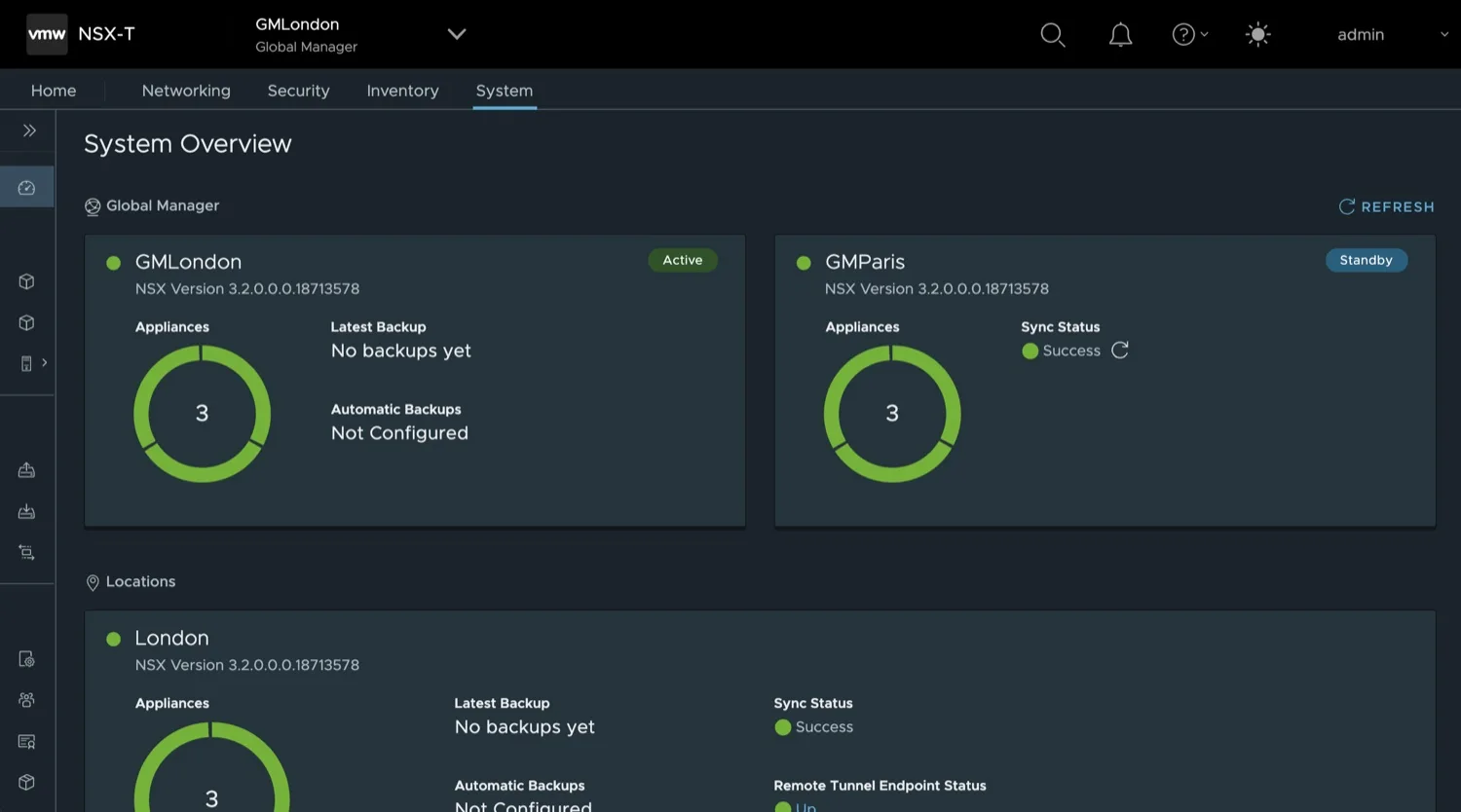
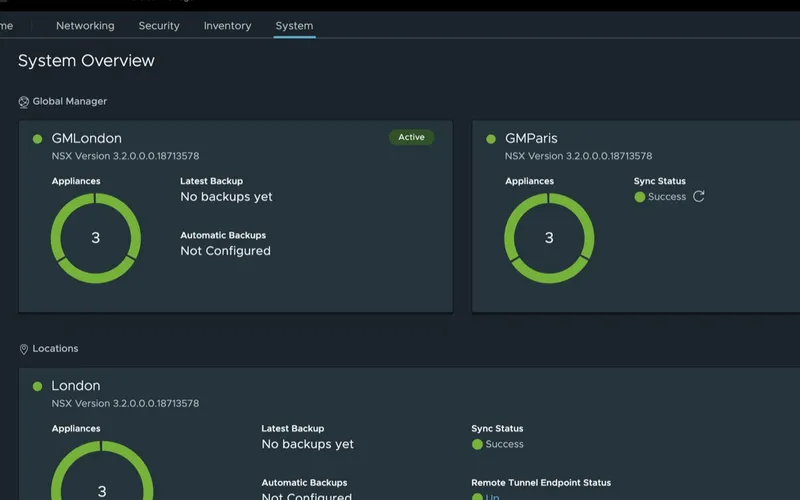
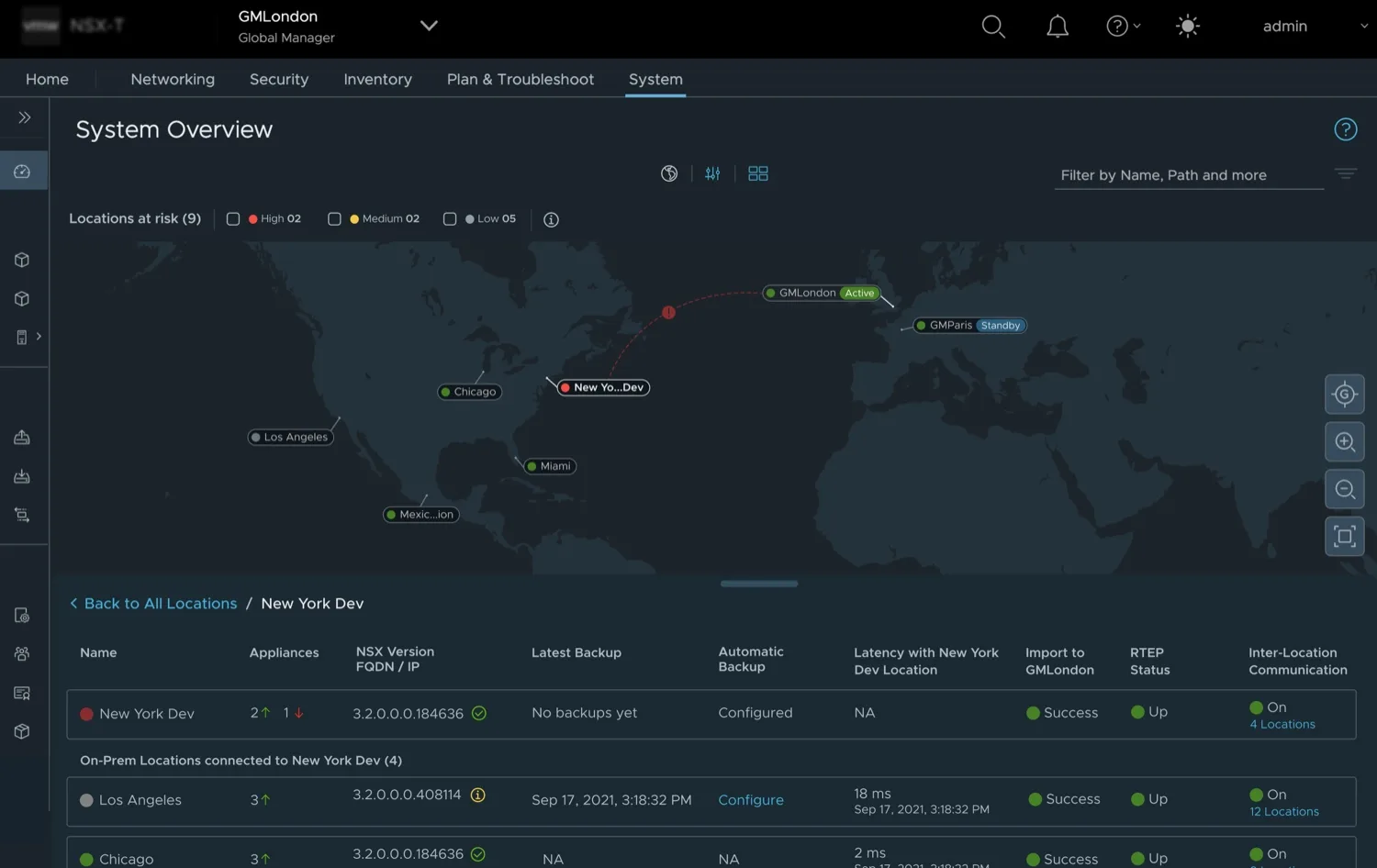
The original NSX Global Manager System Overview: two large Global Manager cards, GMLondon (Active) and GMParis (Standby), each with an appliance donut and fields for latest backup, automatic backups and sync status. The first location card, London, begins at the bottom edge of the screen.
123
NSX Global Manager System Overview, before the redesign. Lab IP addresses removed.VMware NSX · before
  1. 1
    Two cards fill the width. And these are only the two managers.
  2. 2
    Status is a field to read. Backup, sync and tunnel status, one card at a time.
  3. 3
    The first location starts at the fold. Thirty-one more sit below it.
Go deeper 1 min

Who was looking, and what went wrong

NSX Global Manager runs networking and security across many locations from one place. Its System Overview is where an admin checks that every location is healthy: appliances, backups, sync, tunnel endpoints, latency, upgrades.

I started with stakeholder interviews, then validated the problem with users on the existing screen. Three personas came out of it. The primary one, the virtual infrastructure admin, had one complaint above the rest: troubleshooting takes too long.

A status you have to scroll to find is a status that goes unchecked. At two locations the cards were fine. The design target was thirty-two locations, about ten checks each, in one view.

02The real problem

Admins mainly needed to know one thing: is anything wrong?

Mapping the admin's routine showed four jumps across the product. The real job was one question, asked about every location.

The brief as writtenThe brief I worked to
  • How is the estate doing?Is anything wrong, anywhere?
  • A card per location32 locations × 10 checks, one view
  • Pick a visualisationQuestion first, visualisation second
Go deeper 1 min

How an admin checked the estate

  1. 1Hunt through the navigationThe checks lived on different pages.
  2. 2Scroll the cardsSync and backup, one location at a time.
  3. 3Run a separate Health CheckAnother tool, another view.
  4. 4Navigate again to fix itThe fix lived somewhere else.

The reframe

The journey map made the redesign easy to argue for: four steps, each with its own cost, spread across the navigation, the cards, a separate tool and wherever the fix lived.

It also changed what I thought the problem was. The constraint wasn't screen space. Risk assessment had been modelled as navigation, so the admin had to walk to every answer.

So the brief became: show risk with minimal navigation, at the scale the product was heading to. The checks to fit were sync, backups, remote tunnel endpoint (RTEP) status, latency, upgrades, appliances and inter-location connectivity.

03The decision

The design that tested better became the default.

The engineering team's favourite, the world map, became the second view.
The fretboard concept: locations as rows, checks as columns, a green dot for each healthy check and a labelled pill for each problem, such as Failed under Sync Status for Hongkong. A crosshair links the Denver row and the Automatic Backup column, and a tooltip says automatic backup is configured, click to edit.
1234
Concept 2: denser, less familiar, and the one that tested better.Design concept · lab data
  1. 1
    Every location gets one row. Same space each; scale means more rows.
  2. 2
    Every check gets a column. Scan down one column to compare sites.
  3. 3
    Problems are words. Failed, Down, 200 ms. Healthy stays quiet.
  4. 4
    Hover leads to the fix. Crosshair to the headers; the action fits the status.

Tested head to head with 43 participants, unmoderated, in Maze. Research set the default; the map stayed in the view switcher for latency and links.

Go deeper 1 min

Switch between the two concepts we tested, above.

Options before the finalists

I explored alluvial diagrams, radial wheels, topology maps, a world map and a grid. Before we spoke to users, I mapped the team's assumptions in Miro. It showed the world map was a team preference, not a user finding.
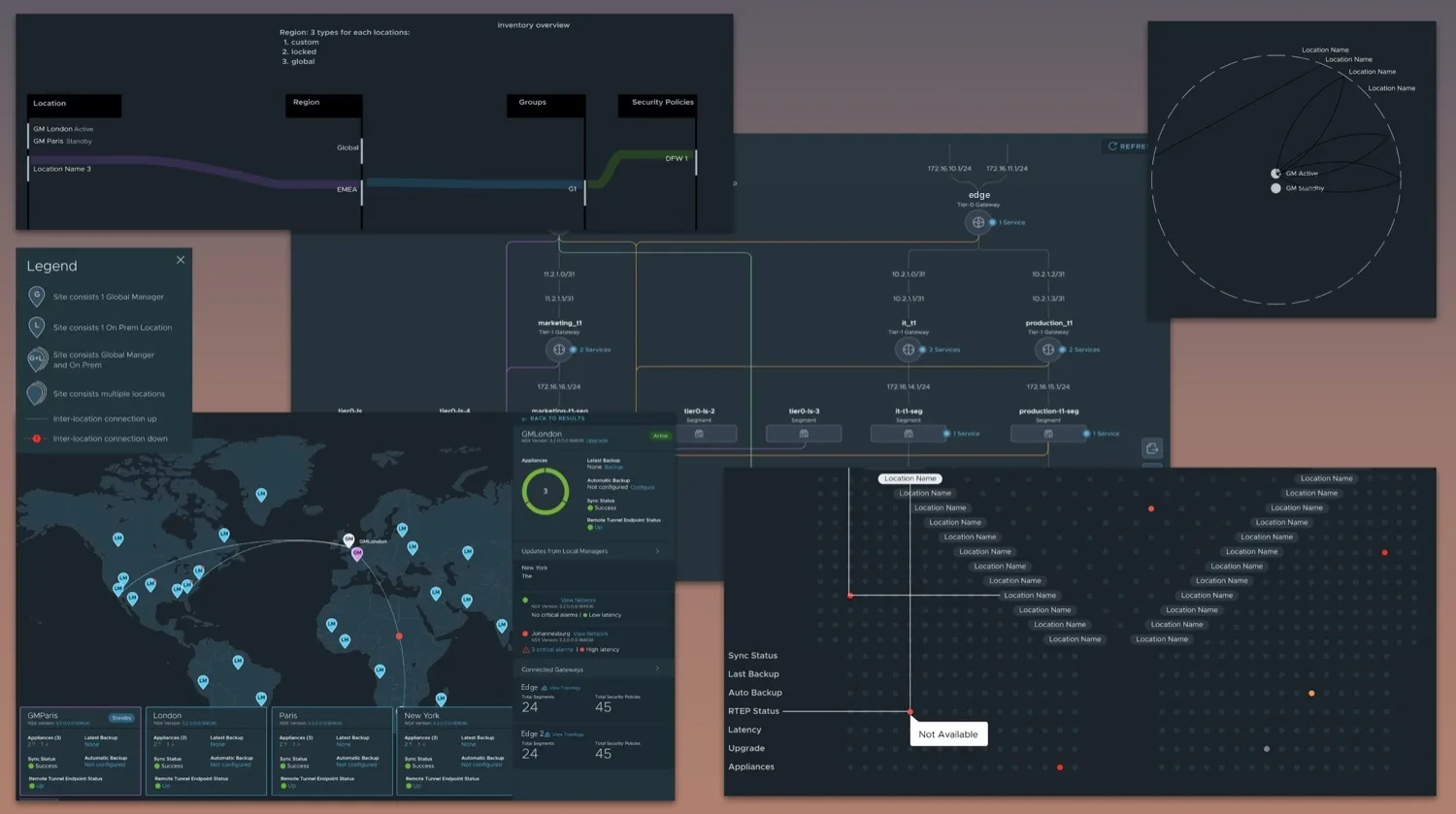
Ideation board of early concepts: an alluvial flow from location to region, groups and security policies; a radial wheel linking locations; a topology map of gateways and segments; a world map with location pins and cards; and the first grid of locations by parameters, with a crosshair on one failed check.
Early concepts: alluvial, radial wheel, topology, world map, and the first grid.Lab data · from omkarux.com/fretboard

The test

  • Both finalists as prototypes, the same tasks, 43 participants, unmoderated in Maze.
  • I stopped adding participants once the results were stable.
  • Validated for the primary persona, assumed for the other two.
  • The raw data is no longer held, so I defend the method, not the decimals.

The disagreement

The UI engineering team, whose manager I reported into, preferred the map. Research overruled the team, me included. After the results, the UI engineering manager moved straight from preference to feasibility: "let engineering evaluate the implementation so we can prioritise the fretboard view." Three of the ten checks moved to other views.

04The rule I set

Each location shows its worst problem, not an average.

One critical problem can't hide behind nine healthy checks, so each location shows its worst.

Redrawn to illustrate the rule.

Go deeper 1 min

Why worst, not average

Status views love a health percentage. For this admin it's the wrong summary: an average lets one critical check hide behind nine healthy ones, and the critical one is the reason they opened the screen.

Where the rule lives

Engineering couldn't supply aggregated statuses, so I put the rule into the legend and the hover. Visible, not silently computed: the admin can see why a location reads the way it does.

Hover that saves a trip

Hovering a cell draws a crosshair back to its row and column headers. The action fits the status: a healthy cell offers Edit, a failed backup offers Configure backup, so the admin doesn't navigate away to fix it.

05Shipped

Shipped as the default view, and published as a patent application.

One screen, three views: the grid opens first, and the map and the cards are a click away.
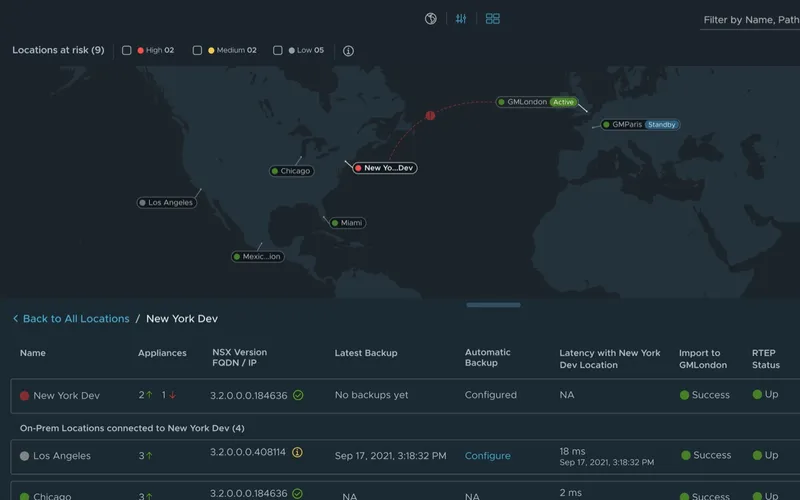
  • The fretboard view: locations as rows and checks as columns, with labelled problem pills.
    Fretboard DefaultIs anything wrong, anywhere?
  • The map view: locations on a world map with connection lines, and a detail table below.
    MapWhere things are: latency and links between locations.
  • The cards view: one large card per Global Manager and location.
    CardsThe original view, one location in detail.

Concept frames, lab data. The build followed this design.

US 2025/0036264

First-named inventor on a published application, US 2025/0036264. VMware's application, "Network status visualization for monitoring and configuration", published January 2025.

Go deeper 1 min

From concept to product

After refinement the fretboard went to development, with engineering and quality engineering involved through implementation. The map wasn't thrown away: it stayed as a second view because it's still the best way to see latency and links between locations.

What I can and can't claim

  • The test compared prototypes before development, not the shipped build.
  • It validated the primary persona; the other two were assumed.
  • The raw data is gone, so I stand on the method: same tasks, head to head, 43 participants, stopped once results were stable.

06If I redesigned it today

The grid works for 32 locations. A thousand would need a different starting point.

The new question: where do I look first, and is it one problem or many?

1 of 3

Open on groups, worst first.

Redrawn to illustrate. Illustrative numbers.

  1. A
    Group by any dimension. Region, provider, data centre, version.
  2. B
    Worst first, said in words. The count is the status.
  3. C
    Healthy collapses to one line. Quiet takes one row, not a thousand.

Grouped by region, 31 alerts land in four places. Correct, but it hides the cause.

2 of 3

Grouped by provider: 31 alerts, one cause.

Redrawn to illustrate. Illustrative numbers.

  1. D
    Shared cause beats geography. Same sites, different grouping, one story.
  2. E
    The system suggests, a person confirms. A guess is labelled as a guess.
  3. F
    One cause, one action. Not thirty-one tickets.

Geography is a grouping, not the layout.

3 of 3

Then narrow down: group, fretboard, site.

Redrawn to illustrate. Site names and times are illustrative; Degr. means degraded.

The worst problem comes first at every level, never an average.

Go deeper 1 min

The screen runs out of room.

Breaks

A row per site stops fitting long before a thousand.

Healthy rows hide broken ones.

Breaks

Calm rows are fine, until they fill most of the screen.

Many failures, one cause.

Breaks

Thirty-one red rows can be one problem.

Why change something that worked

The fretboard answered "is anything wrong?" for thirty-two locations. At hundreds or thousands of sites, three things break: the screen runs out of room, healthy rows hide broken ones, and many failures turn out to share one cause.

What carries over

The rule does. Each group reports its worst, in words, and the fretboard comes back as level two, inside one group, where it works best.

What's new

Grouping by cause rather than place. The system can suggest a shared cause from timing and pattern, but a person confirms it before anyone acts on it.

This is a sketch from today, not shipped and not tested. The numbers are illustrative.

Who was involved

Me, lead designerInterviews, problem validation, concepts, the head-to-head test, the roll-up rule and the spec.
The UI engineering managerThe role I reported into. Moved the team from preference to feasibility after the results.
The UI engineering teamPreferred the map, then evaluated and built the fretboard, keeping the map as a view.
Quality engineeringInvolved through implementation.